
Typing on a remote computer isn’t always convenient—especially on mobile devices or when you just want to get something done quickly. With Screens 5.8.6, we’re introducing Dictation, a simple and powerful way to speak text and have it appear instantly on your remote machine.
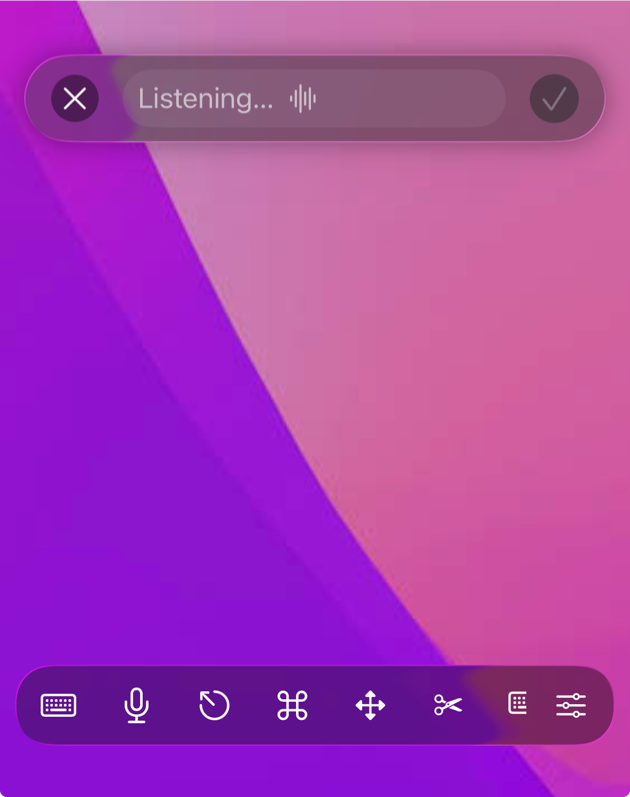
Whether you’re connecting from your iPhone, iPad, Mac, or Apple Vision Pro, you can now use your voice to input text just as naturally as you would locally.
Built on Apple’s Latest Speech Recognition
Dictation in Screens leverages Apple’s latest on-device speech recognition technologies introduced in:
- iOS 26
- iPadOS 26
- macOS 26
- visionOS 26
Because of this, Dictation is only available on those OS versions or newer.

The benefit? Fast, private, and highly accurate transcription.
How It Works
Using Dictation is intentionally simple:
- Connect to your computer as you normally would
- Tap or click the Microphone button in the toolbar
- Start speaking
- Tap the checkmark when you’re done
Screens will then type the recognized text directly into the active field on the remote computer.
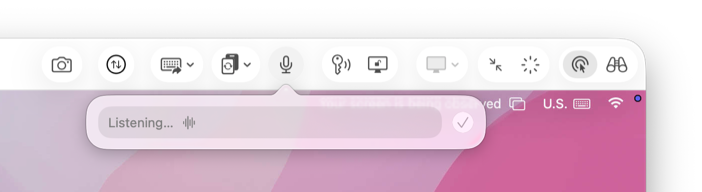
No copy-paste. No extra steps. Just speak and go.
Available Across All Platforms
Dictation is available everywhere Screens runs:
- iPhone – Perfect for quick input on the go
- iPad – Great when using touch or Apple Pencil
- Mac – Seamlessly integrated into the toolbar
- Apple Vision Pro – A natural fit for spatial computing
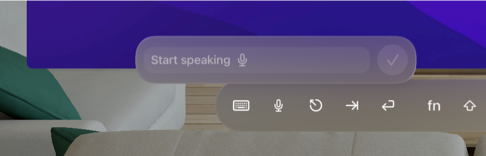
For new users, the Dictation button is available right away.
If you’ve been using Screens for a while, you may need to enable it in:
Settings > Controls > Toolbars
Permissions: One-Time Setup
To turn your voice into text, Screens needs access to:
- Your microphone
- Speech recognition
The first time you use Dictation, you’ll be prompted to grant access. Once enabled, you’re all set.
If you previously declined, you can re-enable permissions in your system settings:
-
On iPhone, iPad, and Vision Pro:
Settings > Apps > Screens -
On Mac:
System Settings > Privacy & Security
A Few Tips
- Make sure the correct window or text field is focused on the remote computer before dictating
- Speak clearly for best accuracy
- Background noise and microphone quality can affect results
Why This Matters
Remote desktop apps have always been about access—but input matters just as much.
Dictation removes friction. It lets you respond faster, work more naturally, and stay in the flow—especially on devices where typing isn’t ideal.
It’s one of those features that feels small at first… until you start using it.
You can give Dictation a try today in Screens 5.8.6.