
Screens 5.10.6 is here, and we're bringing something fun to iPhone Duo: Laptop Mode!
Simply fold your iPhone Duo halfway to turn it into a pocket-sized workstation, with your remote desktop on the upper half and a custom keyboard and trackpad below.
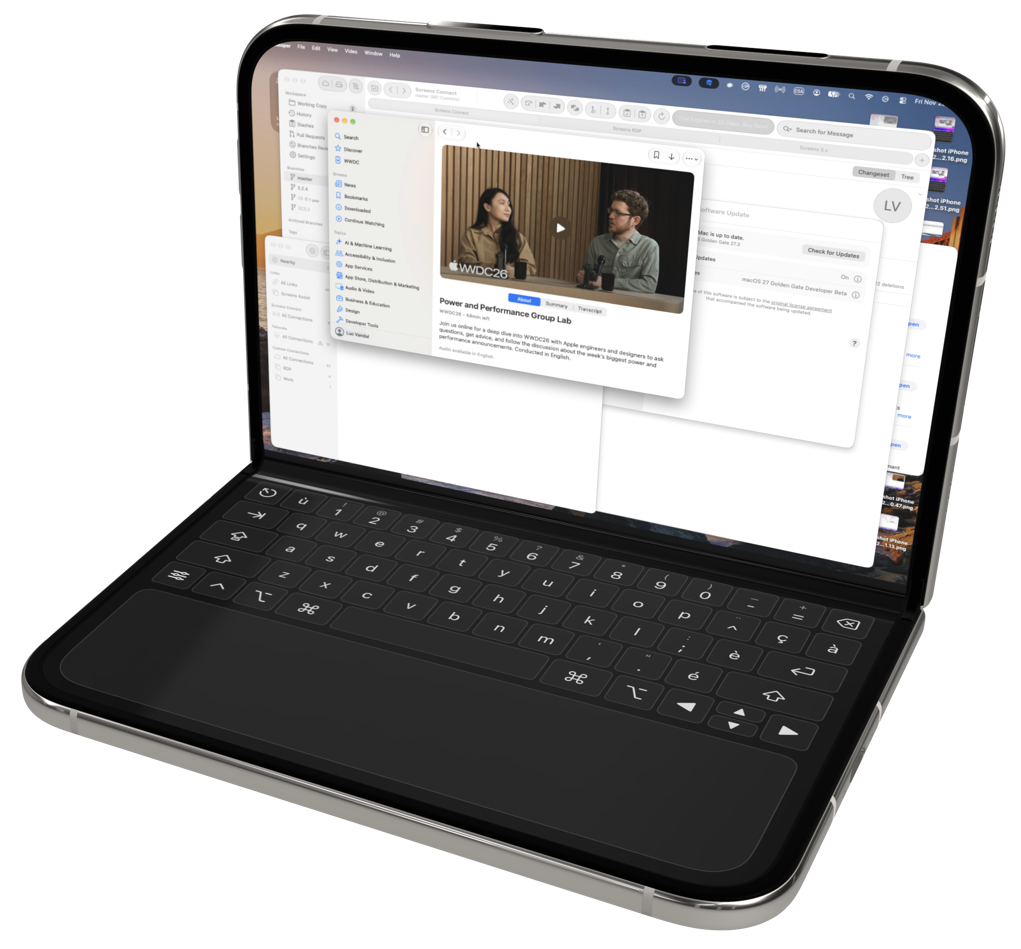
The trackpad supports the same familiar gestures you've come to expect from Screens, while the custom keyboard supports multiple languages, follows your selected system keyboard language, and lets you swipe down on keys to access secondary characters, just like on iPad.
Who knew a laptop could fit in your pocket?
More Control over Dictation
We've also introduced new options for sending dictated text to your remote computer. You can now choose between typing text directly or pasting it via the clipboard, with the option to automatically press Return afterward.
Clipboard pasting works particularly well with third-party keyboards such as Typeless, preserving paragraph breaks without triggering Return prematurely.
You'll find these new options under Settings → Controls → Dictation.
And More!
This update also brings more flexible High Performance desktop sizes on iPhone, including portrait resolutions, new Apple Pencil actions for showing and hiding the keyboard, improved mouse and trackpad handling, and various usability, stability, and performance improvements.
Available Now
Screens 5.10.6 is now available for iOS, iPadOS, and visionOS. The macOS version should follow shortly, pending App Store approval.
Download Screens on the App Store
Enjoy!